
A complete room and chamber management system with a live operations dashboard for reservations, confirmations, check-in and check-out, payment receipts, room transfers and occupancy analytics.
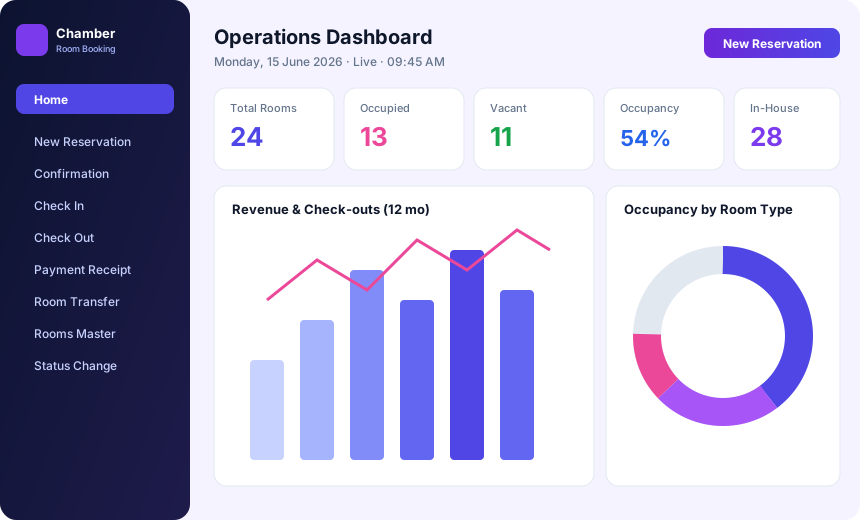
Many clubs run rooms or chambers for members and their guests, and the front desk needs to know at a glance what is available, who is arriving and what has been paid. iTech Gravity's Room Booking & Chamber module shows reservations, availability and occupancy on a live operations dashboard.
Because the module belongs to the same platform as the Club Management System, room charges can sit alongside the member's other billing, and the same reports help the committee see occupancy and revenue together with the rest of the club's numbers.
From the first reservation to the final receipt.
Take reservations and keep a waiting list, so a cancelled room can be offered to the next request.
Handle arrivals and departures from the same screen that shows current room status.
See which rooms are free, booked or occupied without phoning housekeeping.
Record payments, issue receipts and keep a folio of charges for each stay.
Move a guest to another room and keep room status up to date.
Review occupancy and revenue reports to see how rooms are performing.
One flow from booking to check-out.
Take a reservation, or add the request to the waiting list.
Confirm the booking once the room and dates are agreed.
Check the guest in and mark the room as occupied.
Track charges on the folio and issue payment receipts.
Check out, update room status and review occupancy reports.
Each module works on its own and works even better together.
Membership, billing, dues, banquets, events and analytics on one platform.
Learn moreTable tabs, KOTs, split bills, GST and charges posted to member accounts.
Learn moreMulti-store stock, GRNs, indents, purchase orders and low-stock alerts.
Learn moreAttendance, salary structures, PF / ESI / PT and one-click payroll.
Learn moreYes. Reservations and a waiting list are part of the module.
Yes. A live operations dashboard shows room availability and status.
Yes. Payment receipts and a folio of charges are included.
Yes. Room transfer and room status updates are supported.
Occupancy and revenue reports are included in the module.
Tell us about your club and we'll walk you through the software.
Prefer to talk? Call +91 99002 22859 or email support@itechgravity.com.